More room for the music.
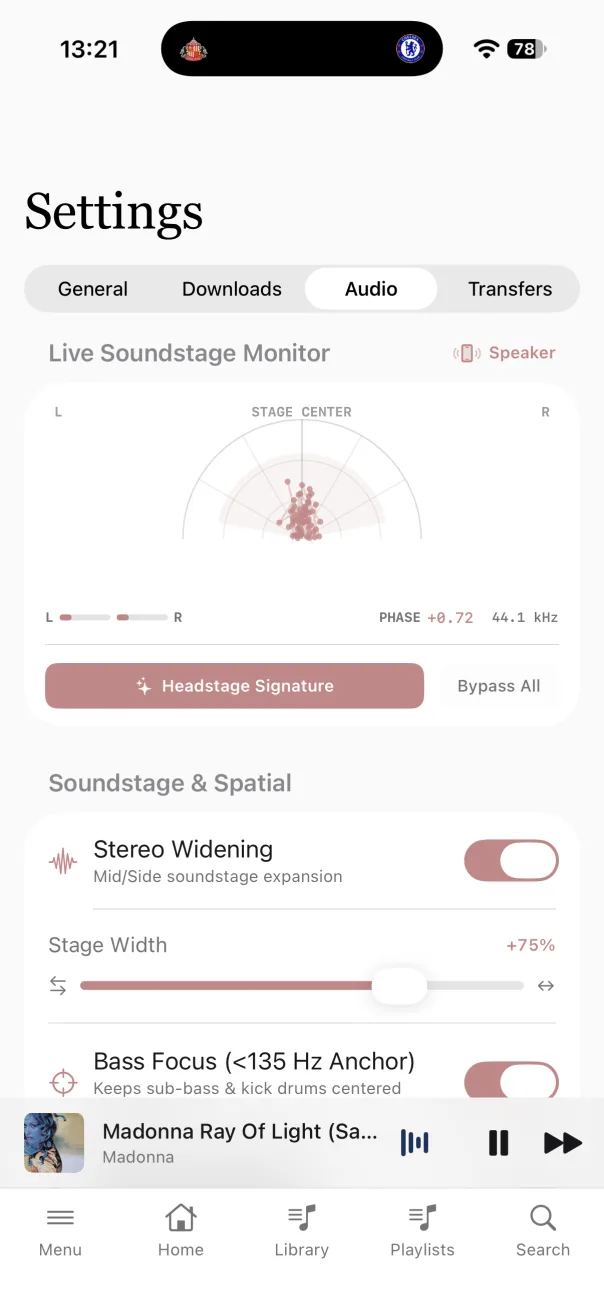
Stereo widening spreads the sound further left and right. Bass Focus keeps frequencies below 135 Hz in the centre, so the kick drum and deep bass stay tight as you widen the rest.
HeadStage plays the music and audiobooks on your Plex Media Server. It’s built for people who enjoy their music and like to spend a bit of time getting the sound right.
With the Headstage Studio DSP Engine, you can open up the stereo sound, add some warmth and adjust it for the headphones you use.
You’ll need your own Plex Media Server with a music or audiobook library.
Explore the audio controls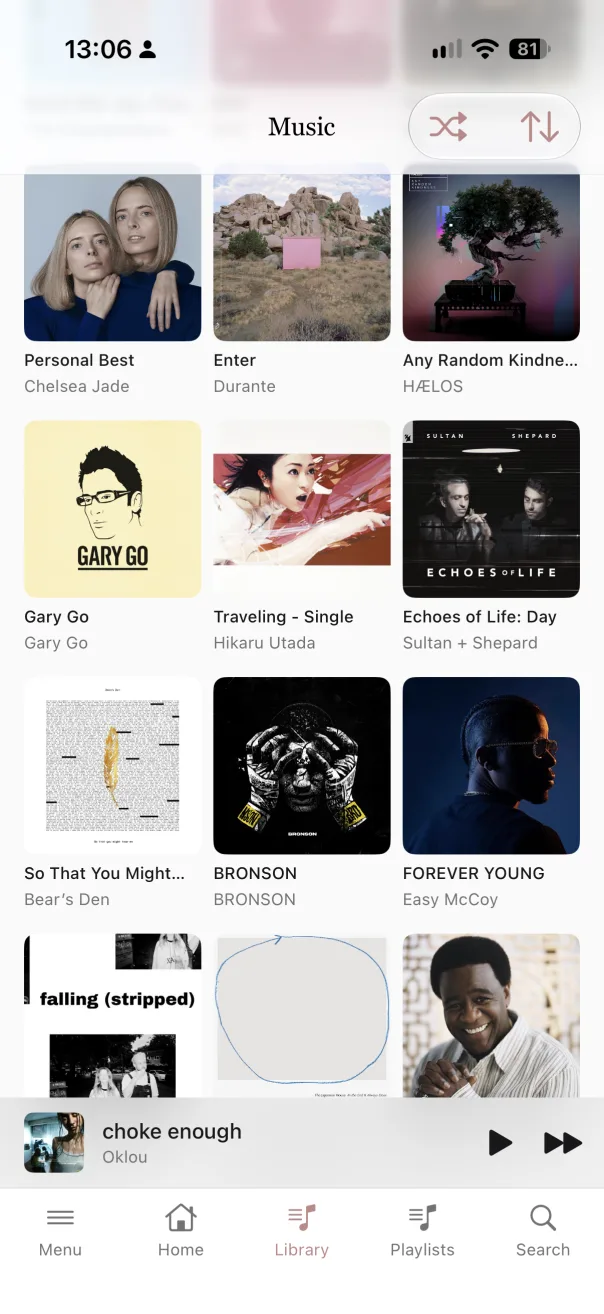
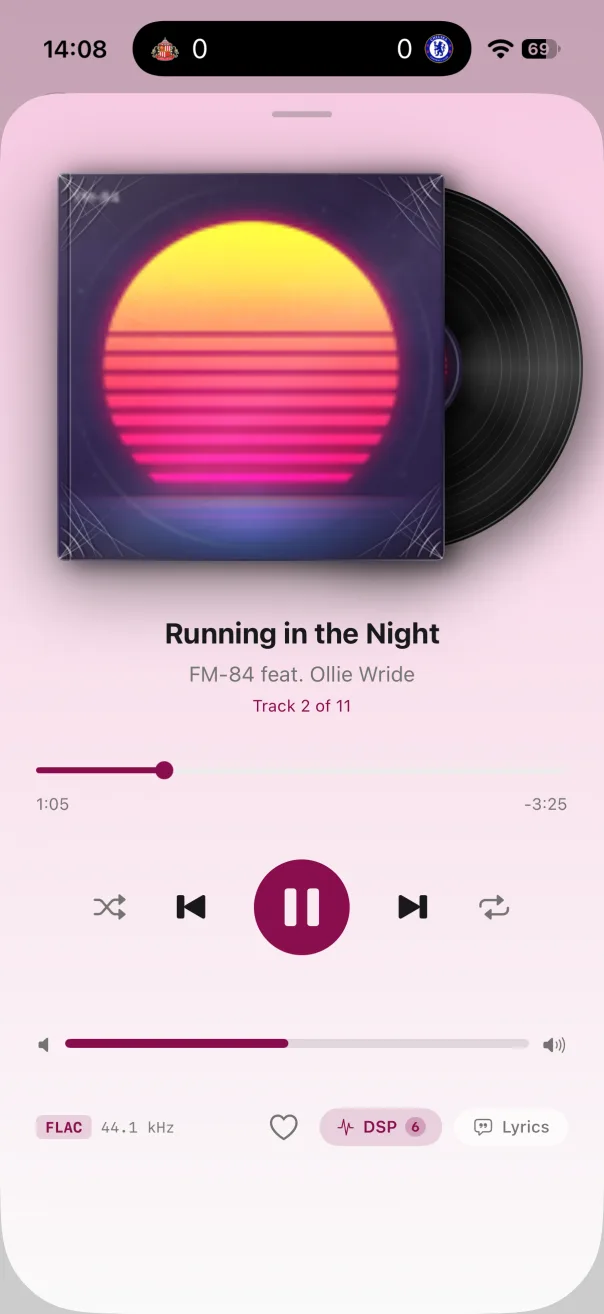
DSP stands for digital signal processing. These are the controls that let you change how your music sounds. Try a setting, listen to the difference and adjust it until you’re happy.
Stereo widening spreads the sound further left and right. Bass Focus keeps frequencies below 135 Hz in the centre, so the kick drum and deep bass stay tight as you widen the rest.
Headphones keep the left and right channels separate. Binaural crossfeed mixes a little of each into the other, more like listening to speakers in a room. There are three settings to try: Nearfield, Studio BS2B and Deep Stage.
If you like the character of tube amps and tape, Harmonic Warmth adds a subtle version of that sound through saturation.
Music can sound a little thin at low volume. Dynamic Loudness Contour brings up the bass and high-frequency detail as you turn it down.
Boosting EQ or widening the stereo sound can push the level too high. The anti-clip preamp makes room for those changes, and a soft-knee limiter helps stop loud peaks from clipping.
Try headphone AutoEQ or a target curve such as Harman Target, Studio Reference or Warm Analog. HeadStage remembers your DSP settings for each audio output, so you don’t have to set everything up again when you switch.
You can switch DSP settings while a track is playing. There’s no need to pause or start it again.
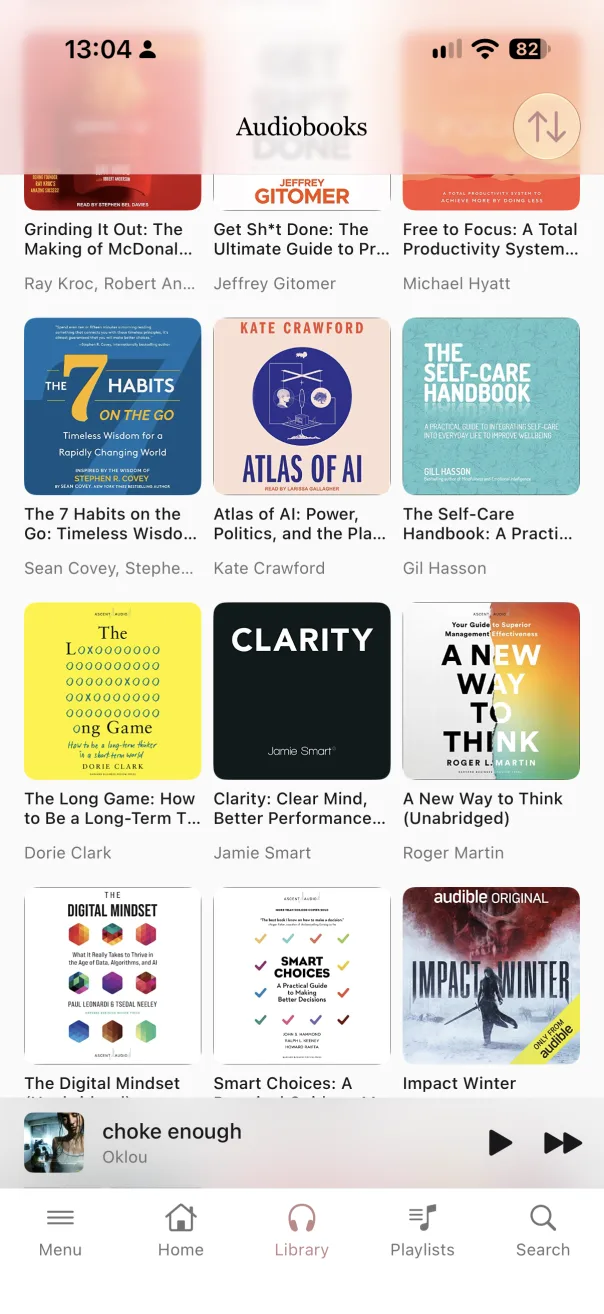
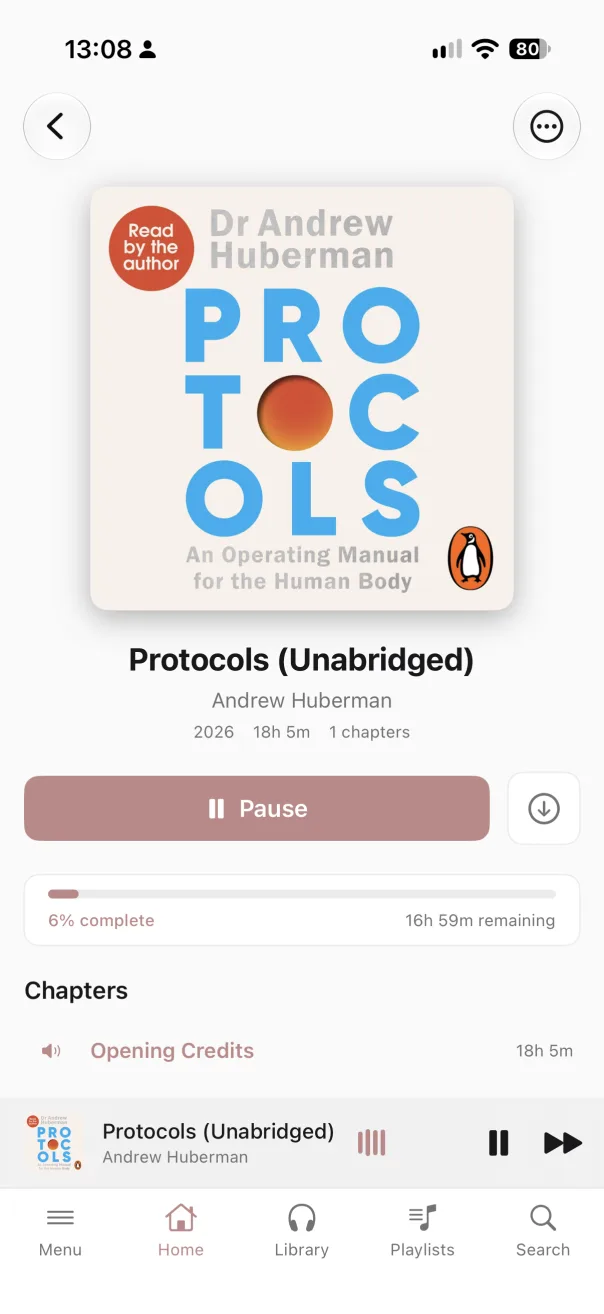
If you keep audiobooks on your Plex server, you can listen to them in HeadStage alongside your music. Browse by cover, choose a book and settle in.
The book’s chapters, your progress and the time remaining are all there on its detail page.
A long list of playlists soon gets hard to browse. HeadStage lets you put them in folders, so you can keep artists, decades or years together, or organise them your own way.
Each folder shows how many playlists and tracks it contains. Open one to browse the playlists inside.
Playlists are for tracks. Collections let you group whole albums or full audiobooks instead. Keep a few favourite albums together, or gather the books you want to listen to next.
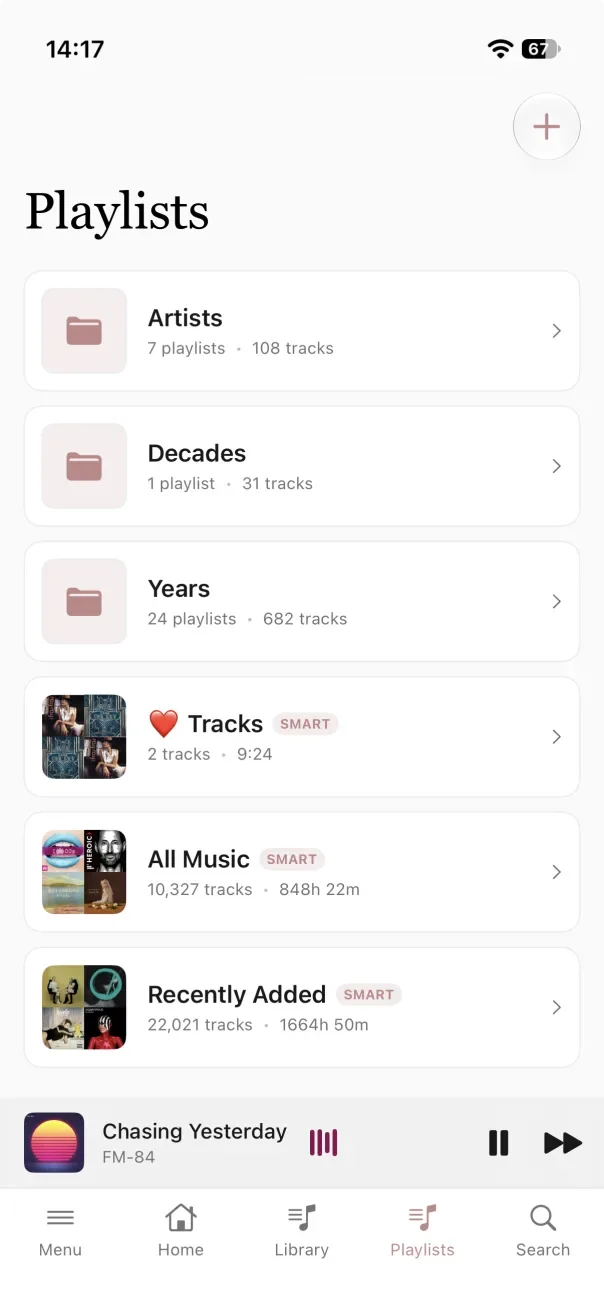
There’s dark mode for those who prefer it, and colour themes if you fancy a change. The pink player shown above is one example.
The screenshots on this page show light mode.
HeadStage is a one-off £4.99 purchase on the Apple App Store.
£4.99 one-off purchase
App Store link coming soon.
You’ll need access to a Plex Media Server with a music or audiobook library. The app purchase doesn’t include a server or any music or audiobooks.
Read the setup guide →HeadStage plays music and audiobooks from Plex Media Server. You’ll need a Plex account with access to a server, and an audio library on that server. Keep the server running while you browse, stream or download.
HeadStage checks the server’s available connections, including local and remote connections, and tries a Plex Relay connection if a direct connection isn’t reachable. Listening away from home depends on your server’s connectivity.
If you already have a server address and token, tap Connect Manually with Token. Enter your Plex Server URL and X-Plex-Token, then tap Connect to Server. Treat the token like a password.
Open Menu → Settings → General. If your account has more than one discovered server, use Plex Server to choose another.
HeadStage reads Plex audio libraries. In Plex, both music and audiobooks need to be stored in a music-type library; HeadStage then decides which audio view to use.
Libraries with “audiobook” or “audio book” in the name are recognised as audiobooks. Audiobook agents and scanners, including Audnexus, can also help HeadStage identify them.
If a library appears in the wrong place, open Menu → Settings → General → Plex Audio Libraries. Set that library to Music or Audiobooks. This changes how HeadStage presents it.
Use Library or the menu to open a library. You can also choose a Default Library in General settings.
Open a music library and choose an album to see its tracks. Tap a track to play it. The mini player stays available as you browse; tap it to open the full player.
Long-press a song, album or playlist and choose Play Next to put it next in the queue, or Add to Queue to put it at the end. In the player’s queue view you can reorder, remove or shuffle upcoming tracks, clear the queue, or save it as a playlist while connected to Plex.
Tap Lyrics in the player to look for lyrics. HeadStage uses LRCLIB to find timed or plain lyrics, so results depend on what’s available and require an internet connection.
The music player also has a sleep timer. Choose a duration or stop at the end of the track; an active timer can be extended or turned off.
While connected to Plex, Sonic Radio can build a queue from tracks similar to the one you’re playing. Sonic Autoplay can add similar tracks when the queue ends. These use similarity results supplied by your Plex server; if it returns no matches, there may be nothing to add.
Open Playlists to browse the audio playlists on your Plex server. You can play or shuffle them, or add them to the queue.
You can also open an existing folder and tap +; its name will already be filled in.
HeadStage uses the first full stop in a playlist’s name to separate its folder from its title. For example, Years.2025 appears as a playlist called 2025 inside Years. In other Plex clients, you may see the full name Years.2025.
To move a regular playlist, long-press it and choose Move to Folder, then choose an existing folder. Choose No Folder (Root) to take it out. Moving a playlist changes its name on your Plex server. A full stop in an existing playlist name can also cause HeadStage to show it in a folder.
Smart playlists can be played and queued, but HeadStage doesn’t offer the same move and delete controls for them. Deleting a regular playlist removes it from Plex, rather than just hiding it in HeadStage.
Collections group whole albums or full audiobooks, rather than the individual tracks in a playlist. They belong to the Plex library containing those albums or books.
To browse your collections, open Playlists and switch to Collections. Open a collection to see its albums or audiobooks.
You can remove an album or book from a collection without deleting it from your library. Collection membership is saved on your Plex server.
Open an audiobook library and choose a book. Its detail page shows chapters, listening progress and remaining time. Plex albums become books in HeadStage, and their tracks become the chapter list.
Start playback from the book or choose a chapter. The full audiobook player has skip controls, a seek bar and playback speeds from 0.5× to 3×.
HeadStage keeps a local record of your position and sends chapter progress to Plex when connected. Progress recorded offline is queued to sync when the connection returns. Other clients may present Plex’s chapter progress differently.
The book menu includes Mark as Read and Mark as Unheard. Marking a book unheard resets its listening progress, so use it when you want to start again.
While connected to your server, open an album or audiobook and tap its download icon. For a single song, long-press the track on the album page and choose Download Track. Let the items you want finish downloading before you go offline.
Downloaded audio can play from your device when the server isn’t available. Browsing playlists and changing items on Plex still need a server connection.
In Menu → Settings, the Downloads tab shows storage use and lets you delete all downloads. The Transfers tab shows active and queued downloads. Removing a download deletes the local copy, not the original on Plex.
In the Downloads tab, turn on Smart Downloads, select a music library and choose a storage limit. This keeps a random selection of music available offline within the chosen limit.
Open Menu → Settings → Audio for the Headstage Studio DSP Engine. You can change the controls while a track plays, so it’s easy to listen to the difference.
The soundstage monitor shows the current stereo image. Headstage Signature applies a preset setup; Bypass All resets the processing controls to a flat setup.
Open Menu → Settings → General → Theme. Choose a mode — Light, Classic, Dark or Night — and an accent colour. The mode is chosen in the app rather than following your phone’s light or dark setting.
General settings also include Dynamic Album Colors, which matches the album view’s background to its cover.
Check that you signed in to the Plex account with access to your server. Confirm the server is running, then try signing in again. If browser sign-in times out, cancel it and start a new attempt.
Check that the server is reachable from your phone’s current network. Away from home, it needs a working remote or relay connection. For a manual connection, check both the server address and token.
HeadStage reads Plex’s music-type audio libraries. Check the library type on your server, then use Plex Audio Libraries in General settings to choose Music or Audiobooks.
Reconnect to the server and check that the download finished. A partly downloaded album or book may only have some tracks or chapters available. Check Transfers for items still waiting or downloading.
Check its name for a full stop. HeadStage treats Folder.Playlist as a folder and playlist name. Moving it to No Folder (Root) removes that folder prefix from the name saved in Plex.